Call of Duty:Black Ops 6:粒子とぼやけたビジュアルが説明した
著者: Emily
Apr 10,2025


*Call of Duty *のような高級ゲームに飛び込むとき、プレイヤーは一流のビジュアルを切望します。しかし、 * Black Ops 6 *グラフィックスのように粒状でぼやけていることに気づいている場合、浸漬を混乱させ、標的の標的をより困難にする可能性があります。恐れないでください、ここに *Call of Duty:Black Ops 6 *の視覚的品質を向上させるためのガイドがあります。
ハードウェア設定を微調整してモニターが処理できる最高の解像度でコンソール出力を確保した後でも、 Black Ops 6が粒子に粗いとぼやけているように見える場合は、特定のゲーム内設定のためにあります。これらの設定は、ディスプレイ、品質、ビュータブの下のグラフィックメニュー内にあり、更新後にデフォルトにリセットされた可能性があります。特に、品質のタブは、 Black Ops 6の外観を強化するために調整するために必要な設定をホストします。
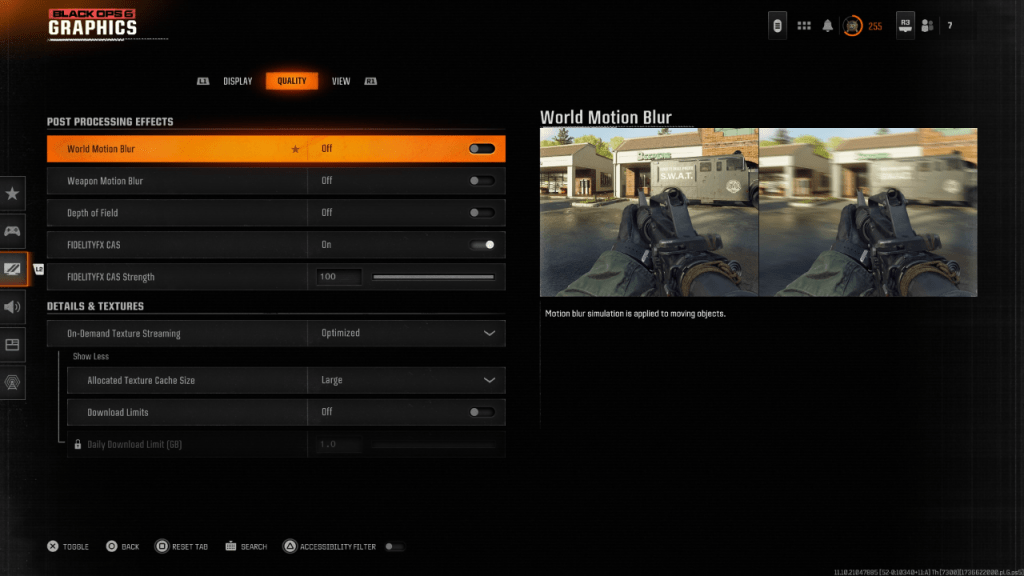 より映画のような雰囲気のために、ゲームには多くの場合、モーションブラーとフィールドの深さが含まれ、カメラレンズ効果を模倣して、映画のような品質を向上させます。これにより、物語主導のゲームに没頭することができますが、 Call of Duty:Black Ops 6のようなペースの速い競争力のあるシューティングゲームでは、これらの効果はターゲットを曖昧にする可能性があります。
これらの効果を無効にする方法は次のとおりです。
上記の設定を調整した後でも、 Black Ops 6がまだ外れている場合、ガンマと明るさにはキャリブレーションが必要になる場合があります。グラフィック設定の[表示]タブに移動し、ガンマ/明るさをクリックし、中央のパネルのコールオブデューティロゴがほとんど見えなくなるまでスライダーを調整します。 50の中間点は通常うまく機能しますが、ディスプレイの特性に応じて微調整します。
次に、[品質]タブで、FidelityFX CASがオンに設定されていることを確認します。これにより、AMDのFidelityFX Contrast Adaptive Sharpeningがアクティブになり、ゲームのビジュアルがシャープになります。 FidelityFX CAS強度のデフォルト設定は50/100ですが、最大100を作成すると、必要に応じてさらに鮮明な画像が得られる可能性があります。画質にまだ満足していない場合、問題はオンデマンドテクスチャストリーミングにある可能性があります。
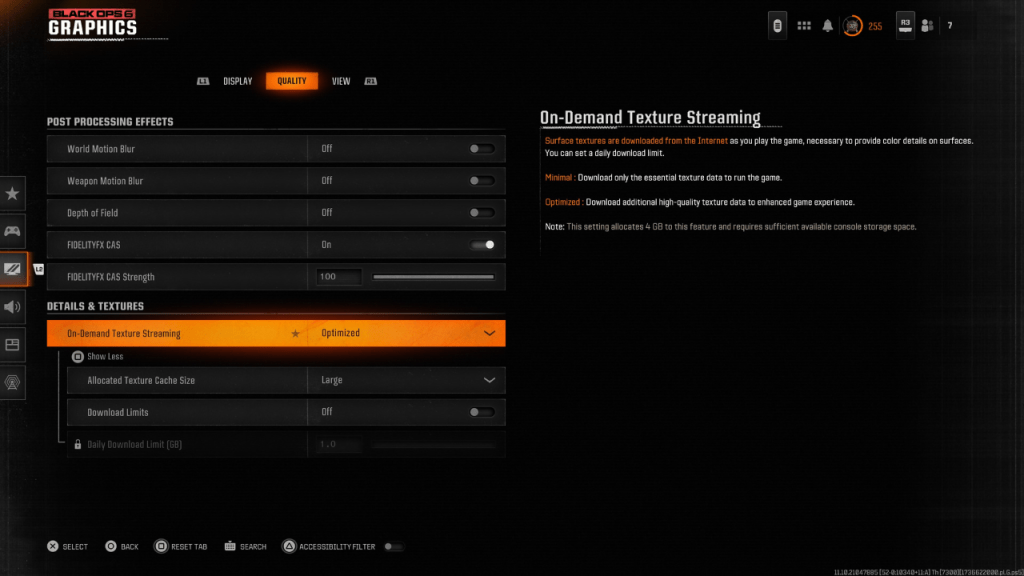 最新のCall of Dutyタイトルの大きなファイルサイズを管理するために、 Black Ops 6はオンデマンドテクスチャストリーミングを採用しています。この機能は、スペースを節約しますが、画質を損なう可能性があるため、ローカルに保存するのではなく、インターネットからテクスチャをインターネットからストリーミングします。
最高のビジュアルについては、[品質]タブの詳細とテクスチャの設定に移動します。オンデマンドテクスチャストリーミングを設定して最適化して、ゲームのグラフィックを強化する高品質のテクスチャをダウンロードします。
「もっと表示」を選択して、さらにオプションにアクセスします。割り当てられたテクスチャキャッシュサイズを大きく調整します。これにより、より多くのストレージが使用されますが、より多くのテクスチャを同時にダウンロードできます。インターネットプランがデータの使用法を制限しない場合は、ブラックOps 6がピークグラフィカルパフォーマンスに必要なすべての高解像度テクスチャを取得できるように、制限をダウンロードしてオフに切り替えます。
そして、それがCall of Duty:Black Ops 6が粒子の粗いとぼやけているように見える方法を修正する方法です。